.svg)
Your Quick Lists will have collections of items standard to the location. Here we'll cover how you can add, edit, or remove certain items.
To make changes, open the Quick List from your Locations Menu. This on handles the Drive Through Window products.
.png?width=670&height=670&name=full%20size%20ipad%20(18).png)
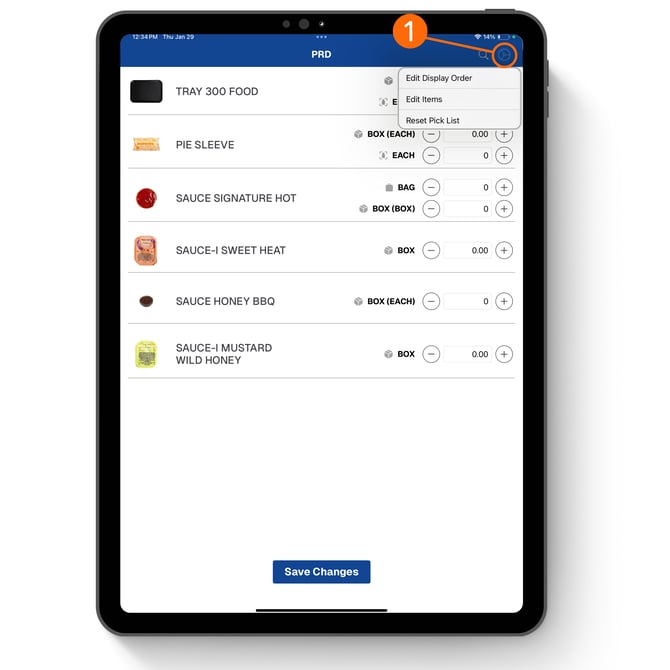
1. Use the Settings Cog to open the Quick List Settings Menu. Here you will find options:
- Edit Items = Add product on the fly or change current item options.
- Edit Order = Rearrange the items to make it easier to count your Location.
- Reset Pick List = Restore Quick List to default settings.
2. Tap on the Add Items to search for additional items and their packaging options you would like included on the Quick List.
3. Use these minus buttons to remove items or item packaging types you do not need on the Quick List.
.png?width=670&height=670&name=full%20size%20ipad%20(18).png)
Once you're done making changes, tap Save Changes confirm your edits. These will save for next time!